

AisleWatch AI / Loss prevention / Cashier and POS video analytics
Find till theft without searching hours of footage.
Someone still has to find the footage for each line of a till exception report. POS video analytics from AisleWatch AI puts each till event next to the clip from that till, and only the ones that do not add up reach loss prevention.
Cashier theft and till losses
Till exception reports list the lines, but each one still needs someone to find the footage and decide if it matters. Most of them are never checked.
- Refunds put through with no customer at the till.
- Drawers opened with no sale.
- Exception reports nobody has time to check.
How POS video analytics works
Till events arrive
Sales, refunds, voids and no-sale opens arrive with the till, the time and the cashier ID.
Each event is checked on camera
AisleWatch looks at the camera over that till for a customer, the items and the scan.
Mismatches go to review
Loss prevention gets the clip with the transaction and makes every decision about staff.
Patterns show up weekly
Repeated exceptions by till or shift appear in a weekly report.
POS-matched events, Store 014
Simulation.
| Time | Till | POS event | Camera | Result |
|---|---|---|---|---|
| 14:02 | 3 | Sale, 6 items | 6 items scanned | Matched |
| 14:09 | 1 | Refund, SGD 84 | Customer present | Matched |
| 14:21 | 2 | No sale | Drawer open 40 s, no customer | Review |
| 14:37 | 2 | Sale, 2 items | 5 items bagged | Review |
| 14:52 | 4 | Void, SGD 12 | Customer present | Matched |
What loss prevention sees for each till exception
Each exception arrives with the transaction and the clip side by side. The store manager sees the same case.
- A drawer opened with no sale.
- A refund with no customer at the till.
- An item passed round the scanner.
- A till left open with nobody at it.
- The cash office entered outside set times.
Loss prevention reviews each case under your own process. AisleWatch makes no decision about any employee.
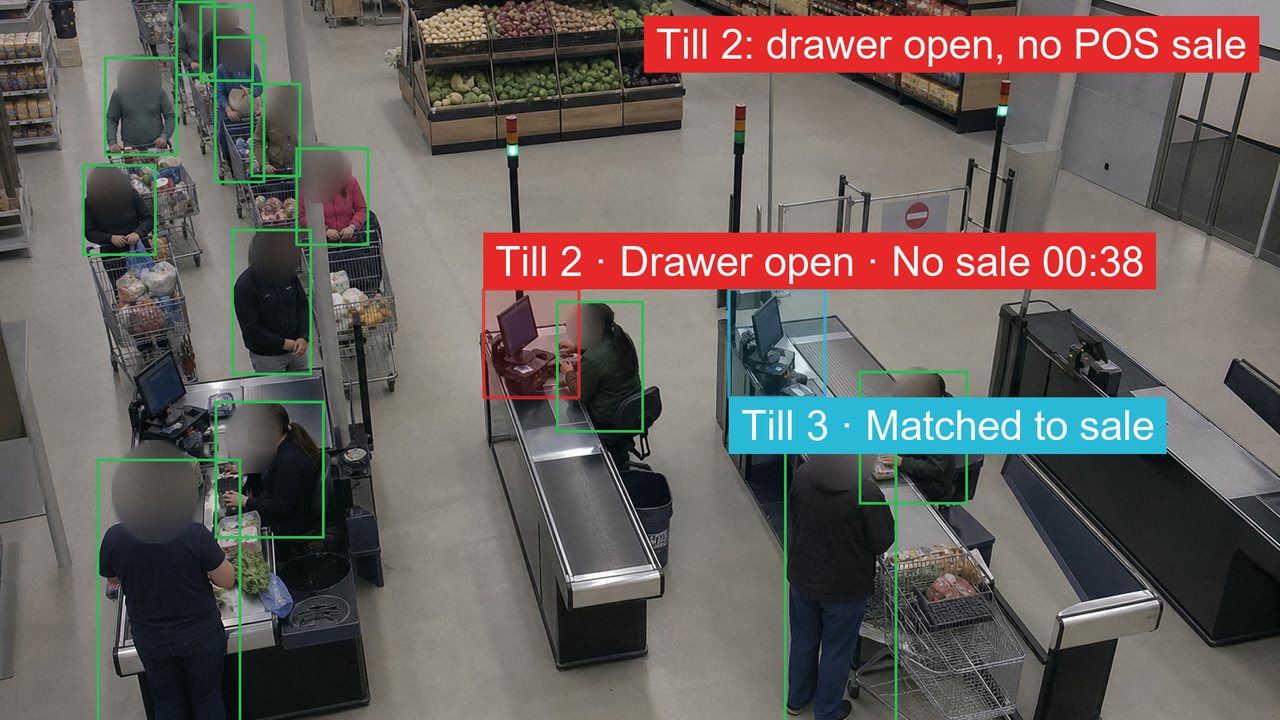 Simulation.
Real-time alert14:21:43
Till 2 was opened with no sale and no customer at the till.
Till 2, Store 014
- Sent to
- Loss prevention, Store 014
- Channels
- Microsoft Teams, SMS, email and the dashboard
- 14:21Loss prevention, by email
- 14:30Store manager, if nobody responds
- Next dayArea manager, if still open
Questions about POS video analytics
What is POS video analytics?
POS video analytics joins till data to the camera over each till. AisleWatch checks each sale, refund, void and no-sale open against the video and flags the ones that do not match.
Which POS systems does AisleWatch connect to?
AisleWatch links to the POS by API, or it reads a transaction export with the till, time and event type.
Can AisleWatch spot sweethearting?
AisleWatch flags till moments where an item passes the scanner with no matching scan on the POS record. The POS link is scoped for each retailer, and loss prevention reviews every flag.
Does AisleWatch decide whether a cashier is stealing?
AisleWatch makes no decision about any employee. It flags the case with the clip, and loss prevention or the store manager reviews it.
Does AisleWatch cover the cash office?
AisleWatch watches the cash office and safe room. The store manager gets an alert when either is entered outside set times or by more people than your policy allows.
See a sample store report from one day of your own footage.
AisleWatch returns the alerts one day of your footage would have raised. The footage is covered by an NDA and deleted after review.